Claude Code Needs you 􀙇 9:41
100% local · no account · no telemetry

Stop babysitting your terminal while Claude Code works.

Dinoradar taps you the instant Claude needs you — a question, a permission prompt, your turn — then tucks away while it works. Plus every token and dollar you're spending, right from the menu bar.

Start free trial
macOS 12+ · Apple Silicon
14-day free trial · then a one-time license
Never miss your turn $ See every dollar Usage you can read Menu-bar + overlay 🔒 Nothing leaves your Mac

Made for Claude Code power users who want to see their spend and never miss their turn.

What it does

Everything Claude's up to, in one quiet place.

No dashboards to host, no API keys, no cloud. Dinoradar reads what's already on your machine and shows it beautifully.

Usage & cost

Every token and dollar — by model, project, tool, branch and hour. See exactly where your spend goes.

Realtime overlay

A floating HUD that pops the instant Claude needs you — a permission prompt, a question, your turn. Juggling several sessions? It lists every one, most urgent first.

Menu-bar status

A single colored dot up top: working, running a tool, done, or needs-you. Glance without switching windows.

Rich charts

Daily spend, token mix, cumulative burn, activity by hour, top tools and MCP servers — interactive charts you can actually read.

Local & private

Everything runs on your machine. No accounts, no sync, no telemetry. Your prompts and code never leave your Mac.

Plan & limits

Track your 5-hour and weekly usage against your Max/Pro limits — the same numbers as /usage — with a live ring on the menu-bar icon as you near the cap.

At a glance

Five states. One dot. Zero context-switching.

The same colored status reads in your menu bar and in the overlay — so you always know whose turn it is.

idle
Claude
Waiting for a session…
working
Claude
Claude is working…
running tool
Claude
Running Bash
pnpm tauri build
done
Claude
Done — your turn
needs you
Needs You
Permission or input needed
↩ Back to Claude
Many sessions at once

Running Claude in five terminals? See them all.

The moment a second session goes live, the overlay becomes a list — one compact row per session, the most urgent on top. Working, running a tool, done, or needs-you: you read every Claude at a glance, no hunting through terminal tabs.

  • One row per live session, auto-sorted — needs-you first
  • Click any row to jump straight to that terminal
  • The card's color follows your most urgent session
  • Finished sessions clear themselves after a moment
A look inside

Built like a cockpit, not a spreadsheet.

Overview
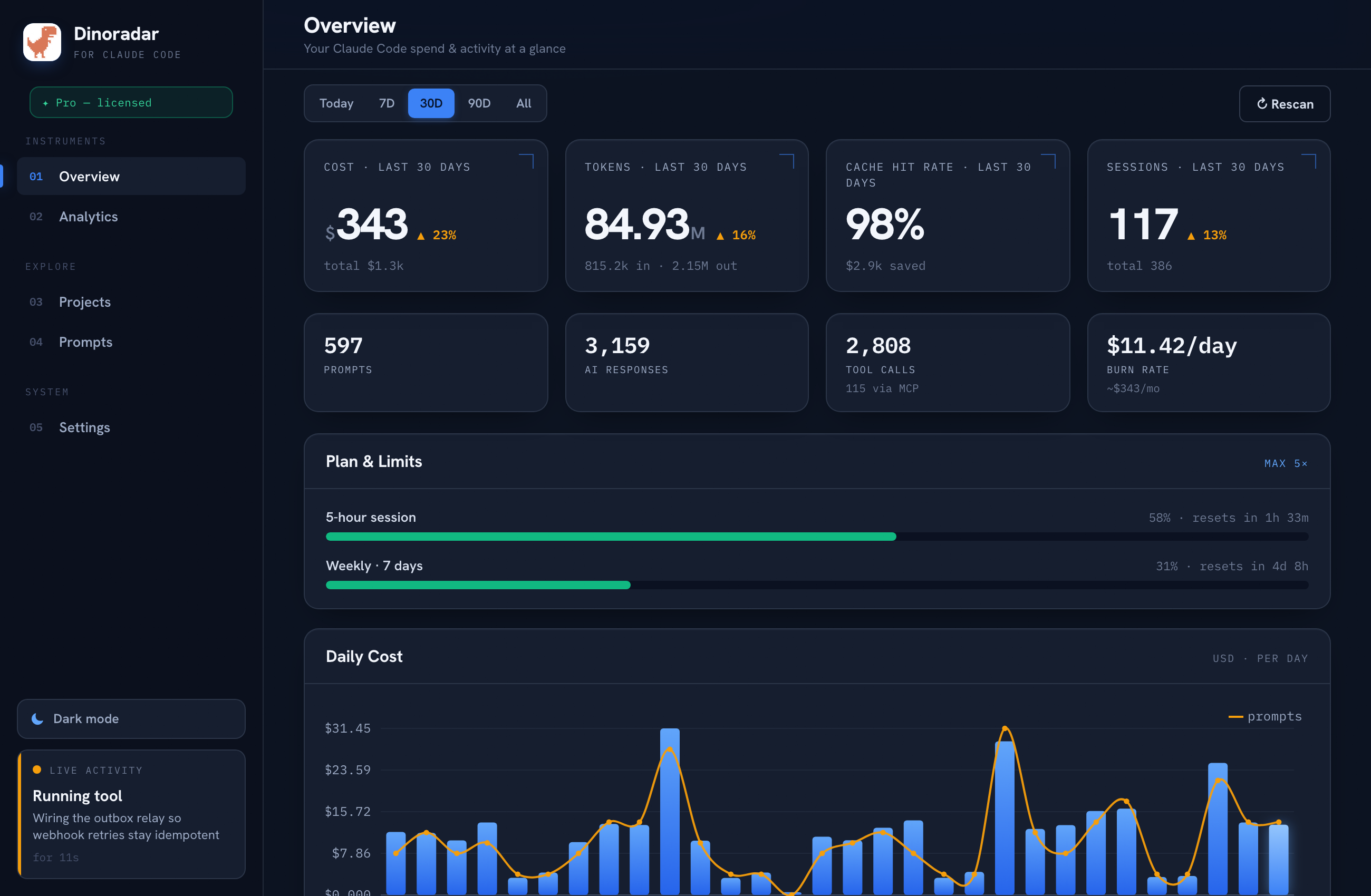
Dinoradar dashboard — Claude Code usage and cost overview
Overview

Your day, at a glance.

Cost and tokens front and center, daily spend, and your biggest models and projects — the numbers that matter, first.

  • Today vs all-time KPIs
  • Cost by model & project
  • Live activity in the sidebar
Analytics
Dinoradar analytics — Claude Code daily spend, token mix and top models
Analytics

Your spend, every way you'd slice it.

Daily spend, token mix, cumulative burn, activity by hour, top tools and MCP servers — interactive charts that adapt to light & dark.

  • Interactive, zoomable charts
  • Filter by Today / 7D / 30D / 90D / All
  • Reads great in light & dark
Get Dinoradar

Start free. Keep it for $29.

Install in one line and try everything free for 14 days. Keep it with a single one-time license — no subscription.

01 Install & start your 14-day trial
curl -fsSL https://dinoradar.com/install.sh | bash
One line — it downloads, installs to /Applications and opens. No right-click, no Gatekeeper prompt. Apple Silicon · macOS 12+ · no account · no card to start · re-run anytime to update.
02 Keep it forever
$29one-time

$39  early-bird price · no subscription

  • Keep using Dinoradar — the full app, forever
  • The live “your turn” overlay & menu-bar status
  • One-time payment — no subscription, ever
  • Up to 3 Macs · best-effort updates
  • 100% local — no account, no telemetry
Start your free trial

Free for 14 days first — buy any time. Already bought? Paste your key in the app (Settings → License).

Runs entirely on your Mac. Uninstall anytime (removes everything): curl -fsSL https://dinoradar.com/uninstall.sh | bash

Up and running in a minute

Three steps. No config files.

Install

Run the installer

Paste the one-line curl … | bash from above. It lands in Applications and opens straight away.

Connect

Enable hooks

Click Enable realtime hooks on the welcome screen. Dinoradar adds small hooks to settings.json — backed up first, removable anytime.

Go

Start coding

Open Claude Code as usual. The menu-bar dot and overlay light up live — working, your turn, needs-you.

Good to know

Questions, answered.

Is my data private?

Completely. Dinoradar runs entirely on your Mac — no account, no cloud, no telemetry. Your prompts, code and numbers never leave your machine.

Do I need an API key or another login?

No. It reads the Claude Code data already on your Mac. Nothing to configure, no keys to paste — install and it just works.

Which plans does it work with?

Any Claude Code subscription. Your real 5-hour and weekly limits appear automatically once Claude reports them — the same numbers as /usage.

Is it made by Anthropic?

No — Dinoradar is an independent tool, not affiliated with or endorsed by Anthropic. “Claude” and “Claude Code” are trademarks of Anthropic.

Which Macs are supported?

macOS 12 or later on Apple Silicon. It installs in seconds and keeps itself up to date — new versions land with one click.

What if it's not for me?

Try everything free for 14 days — no card needed. Not a fit? Just don't buy a license. Questions? Reach out and we'll make it right.

Dinoradar

Put Claude on your radar.

Local, private, and out of your way until it matters. Try it free for 14 days.

Start free trial